

Note: The thesaurus feature is turned on by default and applies even when quotation marks are used.
To turn off the thesaurus:
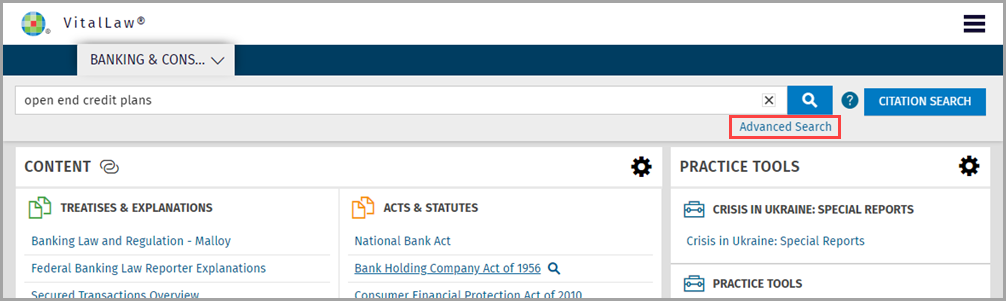
Enter your search term and click the Advanced Search link.
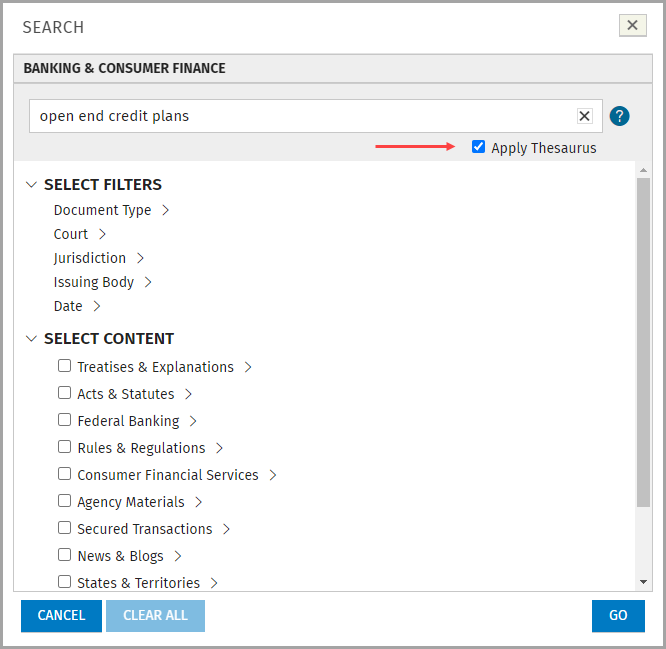
Deselect the Apply Thesaurus checkbox. The thesaurus is no longer applied to future searches.
Select pre-search filters, if desired, and run your search.
To turn on the thesaurus:
Click the Advanced Search link and select the Apply Thesaurus checkbox.
The thesaurus is now applied to all future searches.
Note: Only some State abbreviations are included in the Thesaurus, (e.g., use Oregon, not OR; use Maine, not ME; use Louisiana, not LA; etc.).
TIPS:
Use full state name when your search expression includes a state.
When viewing search results, verify the Thesaurus terms were actually included in your search.
Use Filters to limit your search to a specific State Jurisdiction.